 inbox Me
Password Generator
Generate strong, random passwords with customizable length and character sets. Free, private, 100% browser-based.
Generate a strong random password in your browser with crypto.getRandomValues() — the browser's cryptographically secure random generator. Nothing is sent to a server, nothing is stored, and you can tune length and character sets to what your account actually allows.
Length beats special characters
For years the advice was "use symbols". The current standard says otherwise: NIST SP 800-63B asks for at least 15 characters for user-chosen passwords, drops the forced-complexity rules, and explicitly says not to make users change passwords on a schedule — rotation only after a suspected compromise.
Length is what makes guessing expensive. A 16-character random password from the full character set is not a slightly stronger 8-character one; it is billions of times harder.
Entropy: why 12 random characters beat Password1!
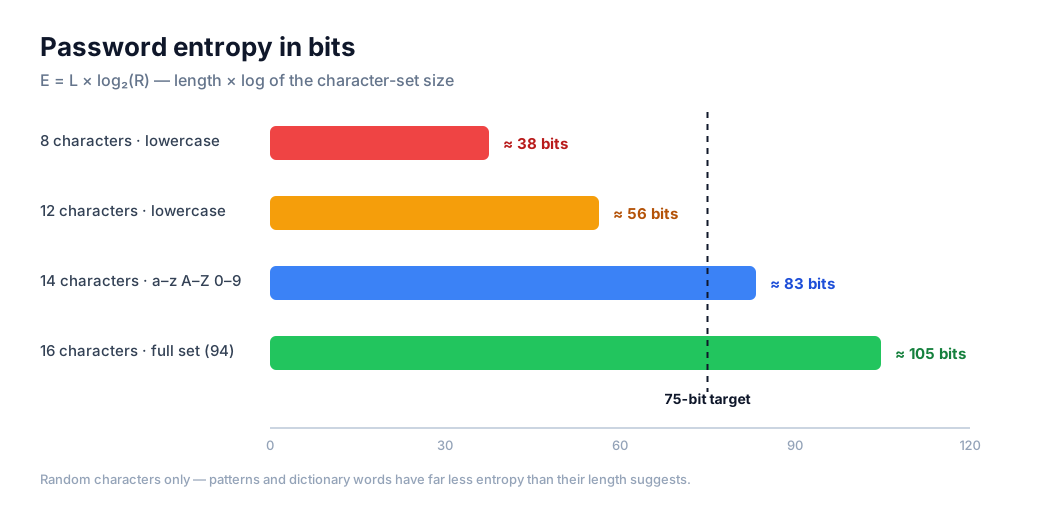
Entropy measures how many possible passwords an attacker has to consider: E = L × log₂(R), where L is the length and R the number of characters your chosen set draws from.
Practical values: 12 lowercase letters ≈ 56 bits, 14 letters and digits ≈ 83 bits, 16 characters from the full set ≈ 105 bits. Below roughly 72 bits an offline attack on a stolen hash is realistic; a strong password should clear 75 bits comfortably.
This is also why predictable substitutions fail: P@ssw0rd! is 11 characters, but it sits in the dictionary an attacker tries first — its effective entropy is far below what its length suggests.
What a good generator must never do
Each character has to be drawn independently from a cryptographically secure source. Generators that build "memorable" passwords — pronounceable words, keyboard patterns, a word plus digits — deliberately shrink the search space, and some password managers still default to that behaviour.
Avoid patterns you can see: repeated characters, sequences, a word with the year attached, or the same password with a different suffix on every site.
Save it in a password manager, not a note
A generated password only helps if it is unique per account — that way a leak on one site cannot unlock anything else. Store it in a password manager, which also generates and fills them for you, and turn on two-factor authentication where it is offered.
If you must remember one by hand, a passphrase of several unrelated random words beats a short complex string: it is longer, easier to type and still resistant to guessing.
Generated locally, nothing stored
Every password is produced with crypto.getRandomValues() in your browser — never Math.random(), which is predictable. No result is sent anywhere, no history is kept and no account is needed.
The strength meter is a simple estimate: length multiplied by the number of character sets you enabled. Treat it as a rough guide to entropy, not a guaranteed crack time.
How this tool works
- Set the length and the character set you need.
- Generate the password locally — nothing leaves your device.
- Save it in a password manager instead of a note or a chat.
When to use it
Use a unique password for every account. A disposable inbox keeps marketing mail out of your real inbox, but it does not replace a password manager or two-factor authentication.
Frequently asked questions
- Are the generated passwords truly random?
- Yes. We use crypto.getRandomValues(), the browser's cryptographically secure random number generator — not Math.random(). Each password is unique and unpredictable.
- Is the password I generate sent to your servers?
- No. Generation happens entirely in your browser. Nothing is transmitted, logged or stored — you can disconnect from the network and the tool still works.
- How long should a password be?
- Fifteen characters or more for a user-chosen password is the current NIST recommendation; sixteen characters from the full character set gives roughly 105 bits of entropy. When a site caps the length, use the maximum it accepts.
- Should I change a strong password regularly?
- Not on a schedule. NIST advises changing it only when you suspect it was exposed. Frequent forced changes push people toward patterns like Summer2026!, which are weaker than the password they replaced.
- Should I use symbols and uppercase letters?
- Yes if the site allows them — a larger character set means more entropy per character. If a site rejects symbols, make the password longer instead: length compensates for the smaller set.
Quick links
Free tools
- Email Validator — Check if an email address is valid, formatted correctly, and has active mail servers. Instant results, no signup required.
- Username Generator — Generate unique, random usernames for gaming, social media, or any online account. Multiple styles, instant results, no signup.
- Fake Name Generator — Generate random fake identities with names, usernames, and emails. Free, instant, no signup. Perfect for testing, privacy, and gaming personas.